Configuring Fields In JSON Editor/Global Configuration
To configure the fields, you need administrator privileges.
To configure the fields, complete these steps:
-
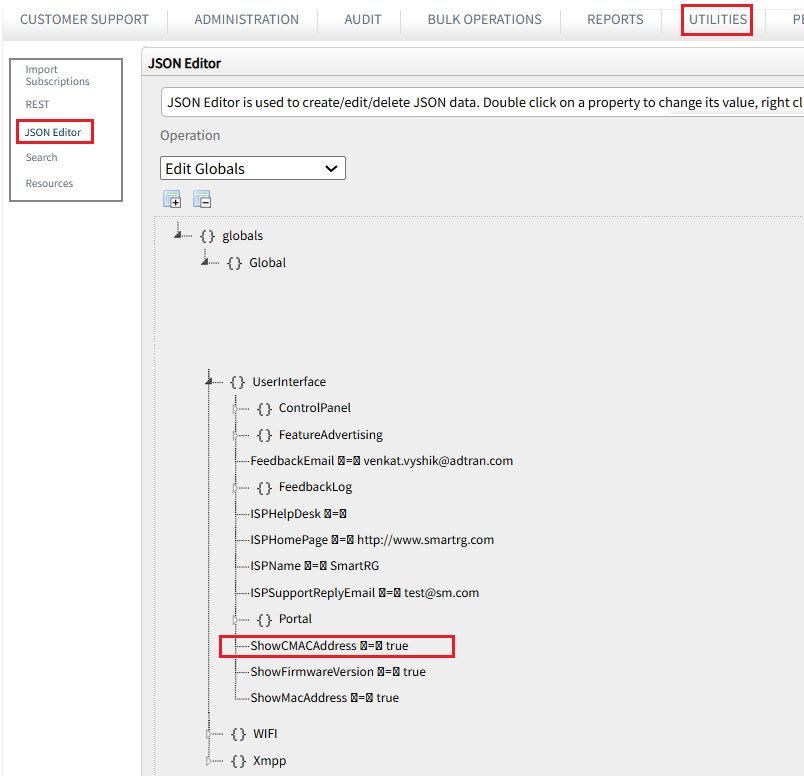
Navigate to Utilities > JSON Editor.
-
From Operations drop-down, select Edit Globals.
-
Expand the Global section and go to UserInterface.
-
Locate and double-click ShowFirmwareVersion and set it to true. This will display the firmware version in the Customer Support page.
-
Locate and double-click ShowMacAddress and set it to true. This will display the MAC address in the Customer Support page.
-
Locate and double-click ShowCMACAddress and set it to true. This will display the CMAC address in the Customer Support page.
-
Locate and double-click Intellifi and add the Home Network URL generated in the Intellifi Page.
-
Click Save to save your changes.