Audit Logs
Audit logs give you a view into exactly what is happening on your system. An audit log records every transaction and event.
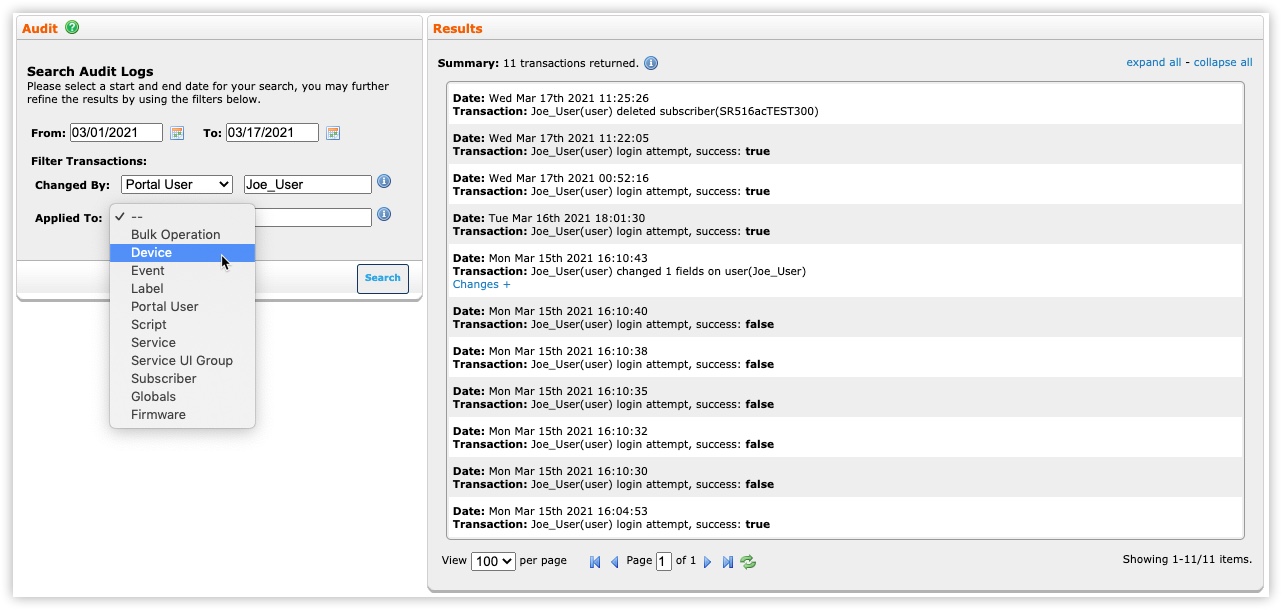
You can view the audit log based on a date range. Filters help you find information by showing only:
- Changes made by a particular portal user, a subscriber, or the system (root) user.
- Changes applied during bulk operations or to a particular device, portal user, or subscriber.
Key Terms
Portal users: Admins or CSRs who can make changes to device or subscriber records and to other portal users’ accounts.
Subscribers: Customers who can make changes to their devices through the control panel. The audit log shows changes to local network and wireless settings, parental controls, and port forwarding.
System: Refers to the system, or root, user who can make changes to any device or user.
Device: Refers to a CPE device or a customer device attached to the CPE device’s LAN.
Launch the Audit Log
- Select the Audit tab.
- In the Audit window, specify a range of dates to display information for. The default is the past five days.
- (Optional) From the Changed By menu, choose one of the following:
- Portal User—Enter the username of a portal user.
- Subscriber—Enter a subscriber code.
- System—Leave this value blank.
- (Optional) From the Applied To menu, choose one of the following:
- Bulk Operation—Leave this value blank.
- Device—Enter a device serial number.
- Portal User—Enter a portal username.
- Subscriber—Enter a subscriber code.
- Select the Query button.
Device Manager displays the audit results.
- You can do the following:
- Under each transaction, select Changes+ to see details about the transaction.
- Select expand all to view details about all transactions. select collapse all to hide transaction details.
- Set the number of results to display per page.
- Page through the results.
- Refresh the results.
Export the Audit Log
To view a CSV file of audit log results, perform these steps:
- In the Results window, select
 .
. - Select webservice.