Gateway Status
Gateway Status provides information about the CPE gateway device for the account, including signal and statistical information you can use for troubleshooting a customer connection. The information available depends on the type of device.
From the left navigation bar, expand the Device Management section and choose Gateway Status.
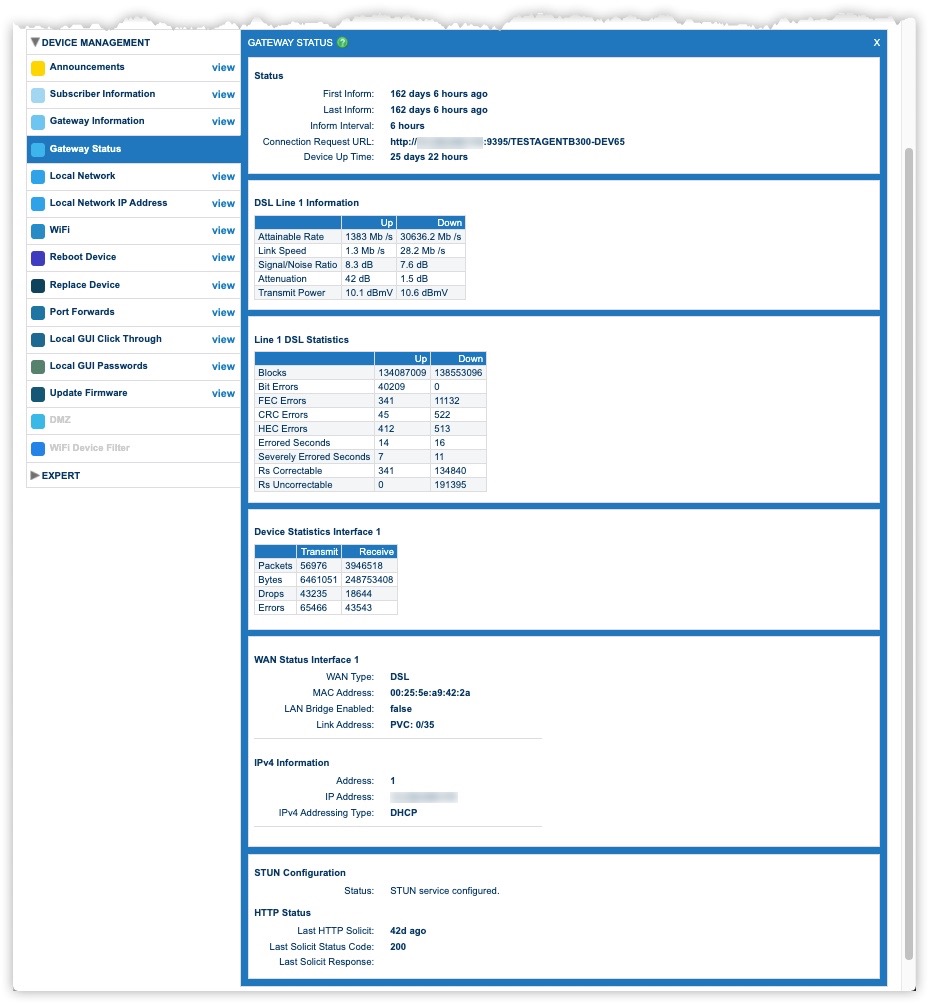
View Gateway Status
The Status section of the Gateway Status window shows basic information about the device, including the time since the first inform (checkin), the time since the most recent inform, the current inform interval, and the amount of time the device has been on since installation or its most recent restart.
Line Information
The Line Information section of the Gateway Status window displays information about upstream and downstream line conditions, including throughput, signal/noise ratio, attenuation, and transmit power. This information is only available for devices that support it.
DSL or Cable
The DSL or Cable Statistics section of the Gateway Status window displays information about the amount of data (blocks) transmitted upstream and downstream. It also displays statistics about line errors. This information is available only for devices that support it.
WAN Interface Statistics
The WAN Interface section of the Status window displays information about the subscriber’s WAN connection. Information includes the WAN ID, interface type, connection type, amount of data transmitted and received, and number of errors and dropped packets. This information is available only for devices that support it.
Video Tutorial