XMPP
The XMPP panel enables you to configure the server and line parameters for this subscriber's XMPP setup.
To access these settings:
From the left navigation bar, expand the Device Management section, then select XMPP.
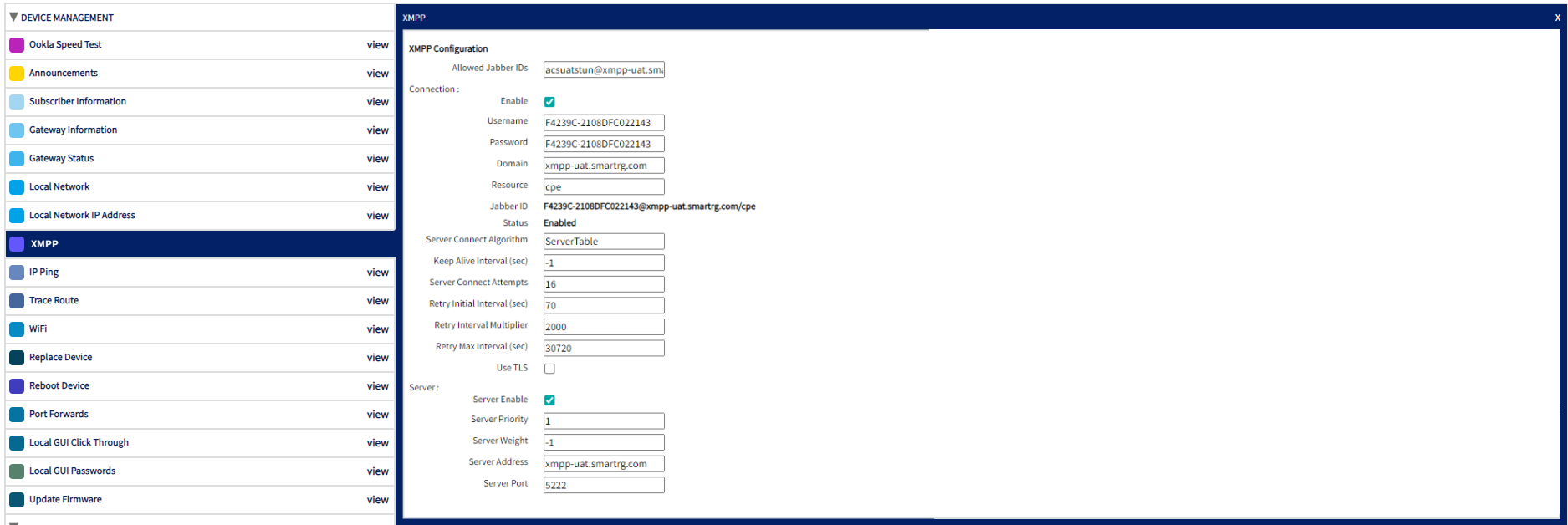
The system will display existing XMPP line parameters stored on the subscriber’s CPE device if present.
XMPP Configuration
Add or edit these parameters as needed by typing in the appropriate field(s).
| FIELD NAME |
DESCRIPTION |
| Allowed Jabber IDs | This parameter is a comma-separated list of strings (up to 32 items). Each entry represents a Jabber ID, or address, that is allowed to initiate an XMPP connection request. If this value is empty, then all addresses are allowed. |
| Enable | Check-box that enables/disables the XMPP connection. |
| Username | Jabber account username. |
| Password | Jabber account password. |
| Domain |
Every XMPP service's domain must be one of the following:
|
| Resource | Resources in XMPP allow multiple clients to run at the same time on one Jabber ID as long as each client is assigned a unique resource. This also allows individual clients to be addressable, meaning that messages can either be sent to all clients or one particular client. |
| Jabber ID |
Unique identifier in the Jabber network. The default Jabber ID is created by combining the user ID and the user's domain. |
| Status | Status of your connected Jabber account. |
| Server Connect Algorithm | The server connection algorithm used by the device. ServerTable is the default value. |
| Keep Alive Interval (sec) |
The keep alive function works by sending a ping to your server at the entered interval (in seconds). A value of 0 disables the keep alive functionality. A value of -1 indicates that the keep alive interval is set at a vendor-specific interval. NOTE: Pinging more than every 300 seconds (or 5 minutes) is not recommended. |
| Server Connect Attempts | The number of times that the XMPP connection will attempt to connect to a given XMPP server. |
| Retry Initial Interval (sec) | The maximum first reconnection wait interval, in seconds. This value should be between 1 to 65535. |
| Retry Interval Multiplier | The reconnection interval multiplier. This value should be between 1000 to 65535. |
| Retry Max Interval (sec) | The maximum reconnection wait interval, in seconds. |
| Use TLS | Check-box that enables/disables Transport Layer Security (TLS). |
| Server Enable | Check-box that enables/disables the server for XMPP functionality. |
| Server Priority | Priority value utilizes the Weight parameter to determine which XMPP connection server is selected by the connection. Value should be 0 to 65535. |
| Server Weight | This parameter specifies a relative weight for entries with the same Priority. The value should be -1 to 65535. |
| Server Address | The device will use this Server Address for creating a connection with the XMPP server. |
| Server Port | The device will use this Server Port for creating a connection with the XMPP server. |
| Registrar Server |
Host name or IP address of the SIP registrar server. NOTE: If this field is empty, the CPE will obtain all of the registrar server configuration information, including host name or IP address, port, and transport protocol, from the values in Proxy Server and Proxy Server Port. Furthermore, any values found in Registrar Server Port will be ignored. |
| Registrar Server Port |
Destination port to be used in connecting to the SIP registrar server. This value must be numeric. NOTE: If the Registrar Server field is empty, the CPE will obtain all of the registrar server configuration information, including host name or IP address, port, and transport protocol, from the values in Proxy Server and Proxy Server Port. Furthermore, any values found in Registrar Server Port will be ignored. |
| Proxy Server |
Host name or IP address of the SIP proxy server. NOTE: All SIP signaling traffic MUST be sent to the host indicated by this parameter and the port indicated by Proxy Server Port. The exception to this is if a value is present for Outbound Proxy or a different route was discovered during normal SIP routing operations. Regardless of which host the traffic gets sent to (Proxy Server or Outbound Proxy), the value of this parameter MUST be used to derive the URI placed into the SIP Route header field of all requests originated by this end-point. The exception to this would be if a different proxy host was discovered dynamically during normal SIP routing operations. |
| Proxy Server Port | Destination port to be used in connecting to the SIP server. This value must be numeric. |
| Outbound Proxy |
Host name or IP address of the outbound proxy. NOTE: If the value is not an empty string, the SIP endpoint MUST send all SIP traffic (requests and responses) to the host indicated by this parameter and the port indicated by Outbound Proxy Port. This MUST be done regardless of the routes discovered using normal SIP operations, including use of Route headers initialized from Service-Route and Record-Route headers previously received. The Outbound Proxy value is NOT used to generate the URI placed into the Route header of any requests. |
| Outbound Proxy Port |
Destination port to be used in connecting to the outbound proxy. This value must be numeric. NOTE: This parameter MUST be ignored unless a value for Outbound Proxy is present. |
When all fields have been completed, select the Save button in the upper-right to commit your changes.